Every PPC manager who uses Claude or ChatGPT has hit the same wall. You want the model to look at an account, so you export a report and paste it in. It answers fast. It sounds right. You have no way to check it, because it only saw the rows you handed over.
MCP is the fix for that, and over the last year it went from a niche protocol to something Google ships support for. Which means the question is no longer whether to connect your ad accounts to an AI assistant. It is which of the dozen available servers to use, and what you are signing up for when you pick one.
We run a lot of ad accounts and we have tried most of these. Here is an honest map.
What an MCP server actually is
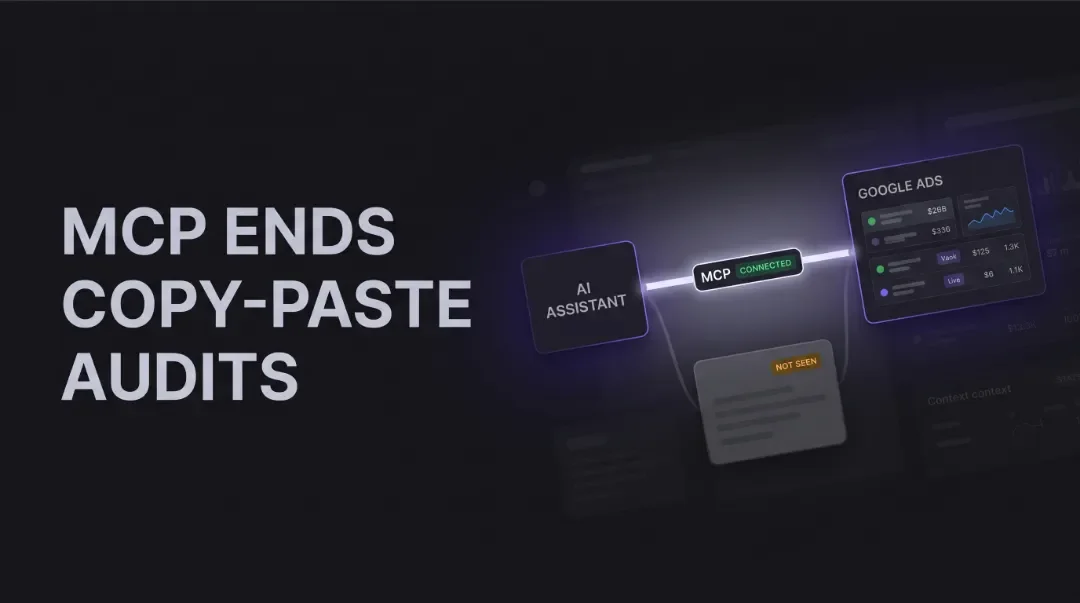
Model Context Protocol is an open standard. It lets an AI assistant pull data from an outside tool by itself, instead of waiting for you to paste something in.
A Google Ads MCP server is the piece in the middle. You connect it once. After that, when you ask a question, the assistant goes and fetches what it needs: campaigns, keywords, search terms, budgets, change history, whatever the question requires.
The practical difference is not speed. It is that the assistant chooses the data. Ask why conversions dropped, and instead of answering from the one report you exported, it can go look at the change history, check the campaigns next door, and compare the week to the one before.
What you can do with one
A few things that work well today, across most servers:
Diagnose a drop. Ask why performance changed last week and let the assistant pull performance and change history together, rather than you checking them in two tabs.
Find wasted spend. Ask for search terms above a spend threshold with no conversions in the last 30 days. You get the list without building a report.
Check an account you do not know. New client, new login, fifteen campaigns. Ask what the structure is and where the money goes.
Write the boring part. Pull last month's numbers for a client summary without exporting anything.
Where it gets shakier is anything that requires judgment, which we will come back to.
Option 1: the official Google server
Google publishes an open-source MCP server for the Google Ads API. It is free, it is maintained by Google, and it is the safest starting point if you have someone technical around.
It is also smaller than people expect. The server exposes three tools: a search tool that retrieves account information, a metadata tool that describes API resource types, and one that lists the accounts your credentials can reach. Alongside those it exposes a few reference resources, including the API discovery document, metrics, segments and release notes. Every tool is retrieval-oriented, so in practice you are giving your assistant a very good read connection to the API and nothing more.
The setup is where most people stop. You need Python and pipx for a local install, a Google Cloud project with the Google Ads API enabled, and a Google Ads developer token with at least Explorer access to query production accounts. For credentials you pick one of three paths: an OAuth proxy with a client ID and secret, Application Default Credentials with the right scope, or the Google Ads Python client library with a google-ads.yaml file. You can also deploy it to Cloud Run, which supports the OAuth proxy approach.
None of that is hard for a developer. All of it is a wall for a media buyer with a Tuesday afternoon and no terminal habits.
Use it if: you have engineering help, you want raw access to the API, or you are building something of your own on top.
Skip it if: the phrase "request a developer token" made you close the tab.
Option 2: community servers
There are a lot of these on GitHub and npm. They range from read-only wrappers meant for PPC managers to servers with full create and update access that can change campaigns directly.
What they add over the official one is usually convenience and scope: more tools, friendlier output, sometimes a one-line install through npx instead of a cloud project.
What they cost you is ownership. You are running software a stranger maintains, against your clients' ad accounts, with credentials you generated and will have to regenerate when they expire. If the maintainer loses interest, you find out the morning it stops working. If the server has write access, the blast radius of a bad prompt is a live budget.
That is not an argument against them. Some are good. It is an argument for reading the code before you point one at an account you are responsible for.
Option 3: a product that includes one
Several PPC platforms now ship an MCP server as part of their subscription. No setup beyond connecting an account, support when it breaks, and the server stays current without you doing anything.
The trade is that you are inside their model of the world. You get the data their product tracks, shaped the way their product shapes it, and you are paying a subscription for the whole thing rather than a server.
Use it if: you already pay for the platform, or you want this working in five minutes without owning any of it.
Skip it if: you want raw API access or you are not going to use the rest of the product.
The thing none of them solve
Here is the part that took us longest to notice, and it applies to every option above.
An MCP server gives your assistant data. Data was never the hard part.
Ask any of these setups whether a campaign should move to Target CPA. The assistant pulls thirty days of performance, sees a cost per acquisition it likes, and says go ahead.
What it did not see: the campaign ran eleven conversions last month and conversion tracking has been double counting since someone dropped a second tag on the thank-you page in the spring. All of that is in the account. None of it was in the rows the assistant decided to fetch.
It also has no idea what the account is for. A $50 cost per acquisition is a win on one account and a disaster on another, and nothing in the API tells it which one it is looking at.
An assistant with raw API access is a very fast analyst with no memory, no standards and no brief. It answers exactly what you asked, using exactly what it pulled, and it sounds equally confident when it is wrong. Add write access and that confidence starts touching budgets.
So the right expectation for any Google Ads MCP server today: it removes the exporting. It does not remove the thinking. You still have to know which question to ask and whether the answer is sane.
A note on permissions
Two things worth settling before you connect anything.
Read or write. A read-only server can only look. A server with write access can change campaigns, and some will do it without a confirmation step. For client accounts, start read-only. You can always add write later. You cannot unspend a budget.
Where the data goes. When your assistant reads an account, that data goes to whoever runs the model you are using. On business and enterprise plans the major providers exclude your data from training by default, but it is worth confirming for your own plan before you connect a client's account, not after.
What we are working on
We manage ad accounts for a living, and we use these servers daily, which is how we ended up frustrated enough to build our own.
The idea is simple: instead of handing an assistant rows and hoping, hand it monitoring. You set what an account is meant to achieve, something watches it continuously against that, and the assistant reads what was already found, with the reasoning attached, rather than reconstructing a theory from a table.
It is not available yet. Get in touch if you want to hear about it when it is.
In the meantime, if you want a set of trained eyes on an account before you point any AI at it, our free PPC audit is a reasonable place to start.
Frequently Asked Questions
What is a Google Ads MCP server?
It is a server that connects your Google Ads account to an AI assistant through Model Context Protocol, an open standard. Rather than exporting reports and pasting them into a chat, the assistant pulls what it needs from the account itself when you ask a question.
Is there an official Google Ads MCP server?
Yes. Google publishes an open-source one for the Google Ads API. It exposes a small set of retrieval tools, including a search tool for account data and tools for API metadata and listing accessible accounts.
Is the official Google Ads MCP server free?
Yes, it is open source and free to run. You still need a Google Cloud project, a Google Ads developer token with at least Explorer access for production accounts, and somewhere to run it, locally or on Cloud Run.
Can a Google Ads MCP server change my campaigns?
Some can. The official server's tools are retrieval-oriented, so it is effectively a read connection. Several community servers do support changes. For accounts you are responsible for, start read-only.
Do I need to be a developer to use one?
For the official server and most community servers, yes, or at least someone who is comfortable with a terminal, OAuth credentials and a cloud project. Servers bundled into paid PPC platforms are the exception, since connecting an account is usually all that is required.
Does it work with ChatGPT, or only Claude?
MCP is an open standard, so any client that supports it works, including Claude, ChatGPT and code editors like Cursor.
Will an MCP server make my AI good at Google Ads?
No. It makes your AI informed about your account. Those are different things. The model still has no idea what the account is supposed to achieve unless something tells it.